



How to Set a Metronome for 6/8, 3/4 and 12/8 — Time Signature and Subdivision Settings (Notation and Audio)

Setting a metronome is more than picking a BPM. Put a 6/8 or 12/8 song on a 4/4 click and the big beats drift apart; play a shuffle against straight eighth-note clicks and the bounce disappears. This guide uses the free DrumMate metronome and shows, in tables, how to match the Time Signature buttons (4/4, 3/4, 6/8, 9/8, 12/8) and the Subdivision buttons (quarter, eighth, triplet, sixteenth, eighth-note shuffle, sixteenth-note shuffle) to the song.
The confusing part is the BPM number in 6/8 and 12/8. The DrumMate metronome still reads BPM as quarter notes in these meters, and plays one dotted quarter (three eighth notes) as one big beat. So big-beat tempo = BPM ÷ 1.5.
- Time signature sets how many big beats are in a bar; subdivision sets how many clicks you hear inside each big beat.
- 6/8 has 2 big beats, 9/8 has 3, 12/8 has 4 — each big beat is three eighth notes.
- In 6/8 and 12/8 the BPM number is in quarter notes, so a song at ♩. = 60 is set to BPM 90.
- 12/8 at BPM 90 with triplet subdivision sounds exactly like 4/4 at BPM 60 with triplet subdivision.
- Use the eighth-note shuffle for shuffles and the sixteenth-note shuffle for swung-sixteenth grooves (half-time shuffle, swung hip-hop).
Time signature vs subdivision
The Time Signature buttons decide how many big beats a bar has. The beat lights on screen show that number: 4 in 4/4, 3 in 3/4, 2 in 6/8, 3 in 9/8 and 4 in 12/8.
The Subdivision buttons decide how many extra clicks sound inside each big beat. Quarter note gives one click per big beat, eighth notes give 2, triplet gives 3 and sixteenth notes give 4. The eighth-note shuffle clicks on the first and third triplet, and the sixteenth-note shuffle does the same on every half beat.
At a glance — metronome settings by time signature
| Song’s time signature | Time Signature button | Big beats (lights) | One big beat | How to count | Subdivision to start with |
|---|---|---|---|---|---|
| 4/4 | 4/4 | 4 | quarter note | 1 2 3 4 | Eighth notes |
| 3/4 | 3/4 | 3 | quarter note | 1 2 3 | Eighth notes |
| 6/8 | 6/8 | 2 | dotted quarter (3 eighths) | 1 2 3 4 5 6 | Triplet |
| 9/8 | 9/8 | 3 | dotted quarter (3 eighths) | 1-la-li 2-la-li 3-la-li | Triplet |
| 12/8 | 12/8 | 4 | dotted quarter (3 eighths) | 1-la-li 2-la-li 3-la-li 4-la-li | Triplet |
| 4/4 shuffle | 4/4 | 4 | quarter note | 1 – a 2 – a 3 – a 4 – a | Eighth-note shuffle |
In 6/8, 9/8 and 12/8, the Triplet subdivision clicks on every eighth note. Start there so you hear each eighth, then switch the subdivision to Quarter note and play with only the big beats.
Reading the BPM number in 6/8 and 12/8
Sheet music and song info usually write 6/8 and 12/8 tempos as a dotted quarter, like ♩. = 60. The DrumMate metronome takes BPM in quarter notes, so multiply by 1.5. Each big beat holds three eighth notes, so eighth notes per minute are three times the big-beat tempo.
| Song tempo (dotted quarter) | BPM to enter | Eighth notes per minute |
|---|---|---|
| ♩. = 40 | 60 | 120 |
| ♩. = 50 | 75 | 150 |
| ♩. = 60 | 90 | 180 |
| ♩. = 63 | 95 | 189 |
| ♩. = 70 | 105 | 210 |
| ♩. = 80 | 120 | 240 |
| ♩. = 90 | 135 | 270 |
| ♩. = 100 | 150 | 300 |
| ♩. = 120 | 180 | 360 |
| ♩. = 140 | 210 | 420 |
| ♩. = 160 | 240 | 480 |
BPM runs from 40 to 240, so ♩. = 160 (BPM 240) is the fastest compound setting. You can also read it the other way: at BPM 90 the big beat comes 60 times a minute — once a second.
Some apps count 6/8 BPM in eighth notes, others in dotted quarters. Before trusting the number, play it with no subdivision and count the clicks per bar: six means eighth notes, two means big beats.
Library songs in 6/8 and 12/8, set on the metronome
In the DrumMate library, the song cards that are not 4/4 are five in 12/8 and two in 6/8. The card BPM for these is the big beat (dotted quarter). Here is that number turned into a metronome setting (Nothing Else Matters is left out because its meter changes mid-song).
| Song | Meter | Card BPM (♩.) | Metronome setting |
|---|---|---|---|
| Perfect — Ed Sheeran | 12/8 | 63 | 12/8 · BPM 95 · Triplet |
| Blue — yung kai | 12/8 | 65 | 12/8 · BPM 98 · Triplet |
| When a Man Loves a Woman — Michael Bolton | 12/8 | 55 | 12/8 · BPM 82 · Triplet |
| Crazy — Aerosmith | 12/8 | 54 | 12/8 · BPM 81 · Triplet |
| I Won’t Give Up — Jason Mraz | 12/8 | 45 | 12/8 · BPM 68 · Triplet |
| Reckless Love — Cory Asbury | 6/8 | 55 | 6/8 · BPM 83 · Triplet |
3/4 vs 6/8 — six eighth notes, grouped differently
3/4 and 6/8 both fit six eighth notes in a bar, which is why they get mixed up. The difference is grouping: 3/4 is three pairs (3 big beats), 6/8 is two groups of three (2 big beats). The eighth notes in these two examples move at the same speed. Set 3/4 · BPM 90 for the first and 6/8 · BPM 90 for the second.
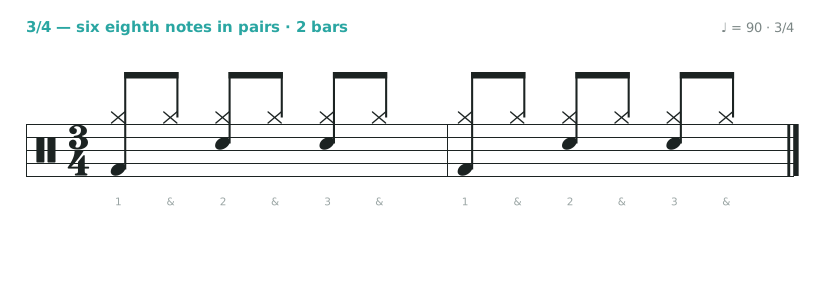
3/4 changes sound on every big beat — “boom tah tah,” a waltz feel.
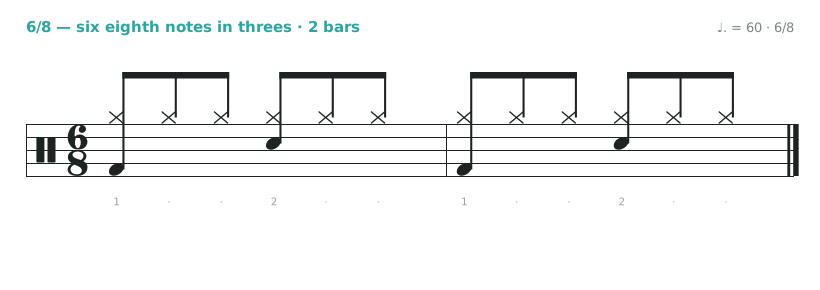
6/8 rocks in two halves — “boom chi chi tah chi chi.” Even at the same BPM 90, the lights blink three times a bar in 3/4 and twice in 6/8. Tap your foot to the song: two taps per bar means 6/8, three means 3/4.
12/8 = 4/4 triplets — same sound, two settings
12/8 sounds the same as 4/4 with every beat split into triplets. Press Listen on both examples below and you will hear the same groove.
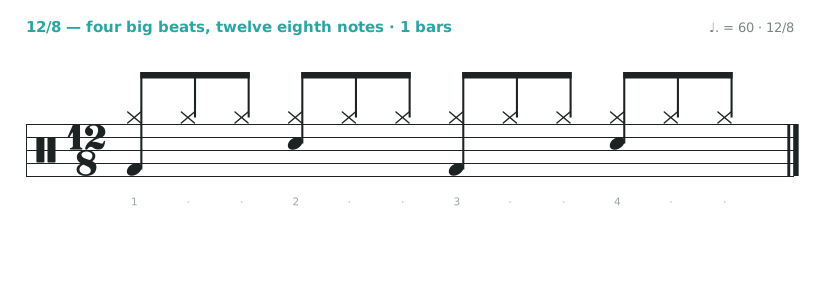
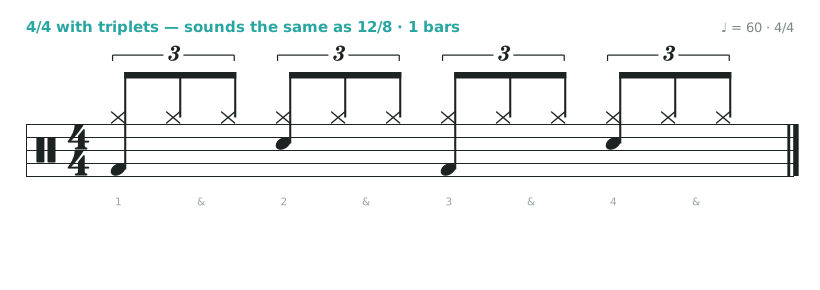
The metronome can be set either way too. 12/8 · BPM 90 · Triplet and 4/4 · BPM 60 · Triplet click in exactly the same places. If the chart is in 12/8, use the first; if it is written as 4/4 triplets, use the second and skip the math. The 12/8 groove itself is covered in the 12/8 slow rock guide.
Two shuffle subdivisions and when to use them
- Eighth-note shuffle — Clicks on the first and third note of each triplet. Fits blues and shuffle rock, where eighth notes bounce long-short. Enter the BPM in quarter notes as usual.
- Sixteenth-note shuffle — Clicks on the first and third triplet of every half beat — swung sixteenths. Fits half-time shuffles and swung-sixteenth hip-hop, where the hi-hat sixteenths bounce.
- When to switch to triplets — If the shuffle click feels vague, switch to Triplet and hear all three notes. Count the middle one in your head and you will hear exactly where the second shuffle note lands.
Practice the shuffle with notation in Shuffle Drum Beat for Beginners — Understanding the Swing Feel Through Triplets, and the swung-sixteenth version in the half-time shuffle guide.
A click practice order for any meter
- Count only: with the subdivision on, say the count from the table out loud and tap the big beats with your foot.
- Hi-hat only: until the subdivision click and the hi-hat sound like one note.
- Add kick and snare: in 6/8, start with kick on the first eighth and snare on the fourth.
- Turn the subdivision off: set it to Quarter note and play the same groove with only the big beats. In 6/8 that is just two clicks a bar, so you fill the space yourself.
- Go to the song: alternate between the song and the metronome setting from the table and check they agree.
The next steps for 4/4 — moving the click to 2 and 4, or dropping bars — are in the metronome practice guide.
Multiply a dotted-quarter tempo by 1.5 to get the metronome BPM; divide the metronome BPM by 1.5 to get the big-beat tempo. For beat lengths in milliseconds, see the tables in the BPM math guide.
The free DrumMate metronome opens right in your browser with nothing to install. Pick the time signature and subdivision from the tables above, and if you do not know the song’s tempo, measure it first with Tap Tempo or the Song Analyzer on the same page. Library songs can be practiced along with the original recordings.


